
The 1% Secret Problem
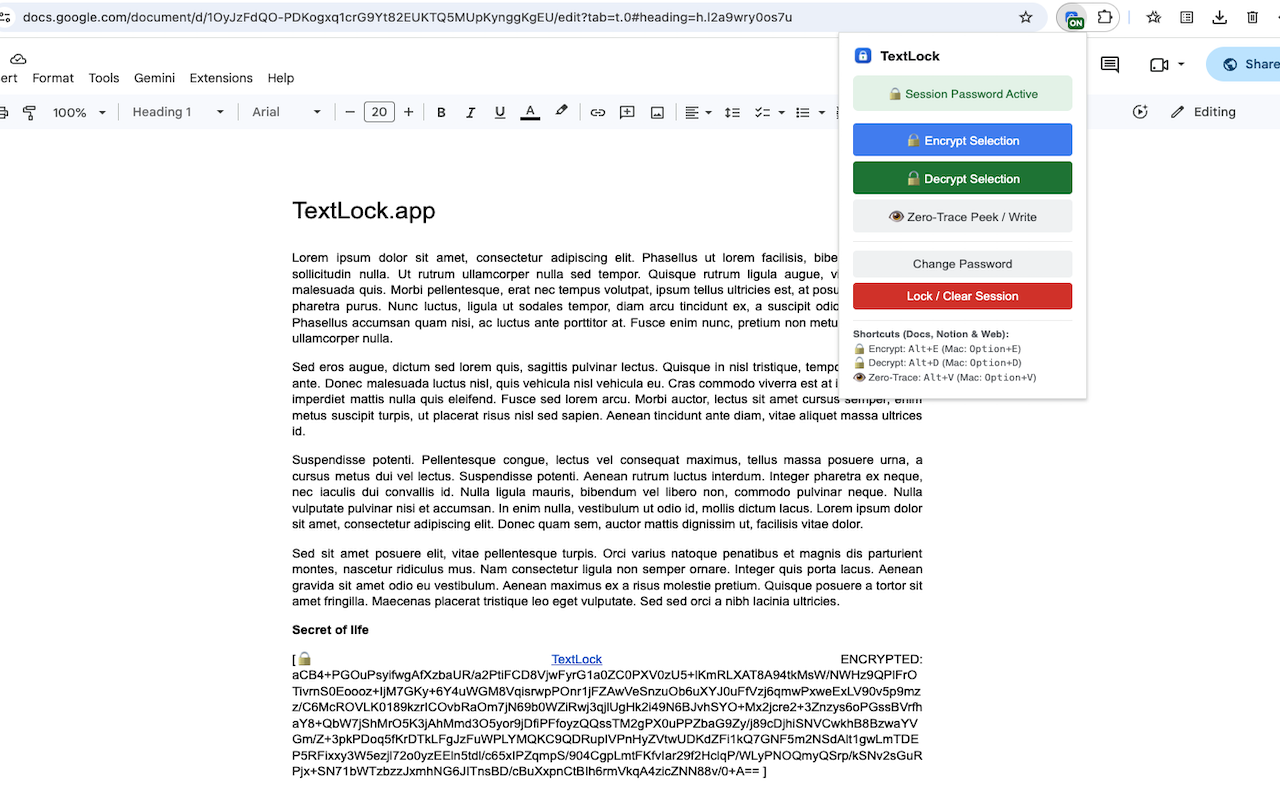
Like thousands of software engineers, founders, and knowledge workers, my daily workflow is split across two fundamentally opposing worlds:
The Private World: Local-first, end-to-end encrypted notes inside Obsidian. My private thoughts, database credentials, server connection strings, client billing terms, and security keys stay safely locked on my local NVMe drive.
The Collaborative World: Cloud-native, real-time multiplayer workspaces like Google Docs, Notion, and Google Sheets. This is where my team conducts roadmap discussions, comments on technical specs, shares meeting minutes with clients, and drafts proposals.
For years, I lived with this constant cognitive friction. Whenever I needed to collaborate on a system architecture document with team members or share an onboarding guide with a contractor, I faced an infuriating dilemma:
- If I kept the document in Obsidian, nobody on my team could comment, edit in real-time, or collaborate without complicated Git setups or proprietary syncing plugins.
- If I moved the document to Google Docs, every database password, staging token, webhook signing secret, and private client rate had to be stripped out, stored in a separate password manager, or risked sitting in plaintext for any shared user—or Google’s indexing bots—to read.
I call this The 1% Secret Problem.
In almost every sensitive document—whether it’s a technical runbook, a legal joint venture agreement, a financial budget, or an executive hiring brief—99% of the content is completely safe to share. You want your team to search it, comment on it, and improve it. But that remaining 1% contains secrets so sensitive that leaking them could compromise your entire infrastructure or breach an NDA.
Existing solutions force you into an all-or-nothing trap:
Full file encryption (e.g., password-protected PDFs or encrypted zip files): Destroys searchability, kills real-time comments, and makes version tracking impossible.
External Secret Managers (e.g., 1Password, Bitwarden, AWS Secrets Manager): Great for machine credentials, but completely severs the secret from its narrative context. A developer reading a deployment guide has to context-switch across three windows just to find the corresponding staging parameter.
I wanted the holy grail: collaborate on 99% of the document in Google Docs or Notion, while encrypting the sensitive 1% inline with military-grade AES-256.
That's when I found TextLock.
1. Why Existing Approaches Failed
When team first sat down to build a browser extension to encrypt text in Google Docs, we thought it would take a weekend. Highlight some text, read window.getSelection(), run Web Crypto, and replace the DOM node. I couldn't have been more wrong.
The Google Docs HTML5 Canvas Wall
In 2021, Google migrated Google Docs away from traditional HTML DOM rendering.
In a standard webpage or simple editor, selected text exists in the browser’s DOM tree:
// Standard web text selection — DOES NOT WORK in Google Docs!<br>
const selection = window.getSelection();
const text = selection.toString(); // Returns "" in modern Google DocsIn Google Docs, text is painted directly onto an HTML5 Canvas using a proprietary Skia-based 2D graphics pipeline. There are no DOM text nodes. When you drag your mouse across a line of text, window.getSelection() returns completely empty.
If your extension cannot read the DOM selection, how do you read the user's highlighted text? And more importantly, how do you replace it with an encrypted block?
2. The Cryptography: Zero-Knowledge by Design
From day one, we established a non-negotiable rule: TextLock must have zero servers, zero telemetry, and zero user accounts.
Security tools often become the very attack vector they claim to protect against. If an extension transmits user text or master passwords to an AWS backend, that backend becomes an irresistible honeypot for threat actors and subpoena requests.
TextLock operates entirely on the W3C Web Crypto API, running natively in compiled browser C++ routines.
The Key Derivation Pipeline (PBKDF2-SHA256)
When you set a session password in TextLock, we derive a 256-bit symmetric encryption key using PBKDF2 (Password-Based Key Derivation Function 2) configured with:
Hash Algorithm: SHA-256
Iterations: 100,000 rounds (resistant to GPU brute-force attacks)
Salt: 16 cryptographically random bytes generated via crypto.getRandomValues(new Uint8Array(16)) per encryption operation.
// Deriving a 256-bit AES key from user passphrase
async function deriveKey(passphrase, salt) {
  const enc = new TextEncoder();
  const keyMaterial = await crypto.subtle.importKey(
    'raw',
    enc.encode(passphrase),
    { name: 'PBKDF2' },
    false,
    ['deriveKey']
  );  return crypto.subtle.deriveKey(
{
name: 'PBKDF2',
salt: salt,
iterations: 100000,
hash: 'SHA-256'
},
keyMaterial,
{ name: 'AES-GCM', length: 256 },
false,
['encrypt', 'decrypt']
);
}
Authenticated Encryption (AES-256-GCM)
We chose AES-256-GCM (Galois/Counter Mode) because it provides Authenticated Encryption with Associated Data (AEAD).
Unlike older modes like CBC, GCM computes an authentication tag over the ciphertext. If even a single byte of the encrypted payload is tampered with, truncated, or modified by an attacker, decryption fails instantly and securely rather than outputting garbage plaintext or falling victim to padding oracle attacks.
Each encrypted line packs:
16-byte Salt (for key derivation)
12-byte IV (Initialization Vector, never reused)
16-byte GCM Authentication Tag
Ciphertext Payload
Volatile RAM Session Storage
Where should the master password live while you work?
- Storing it in localStorage or chrome.storage.local is dangerous because data persists to disk unencrypted.
- Asking the user to type their passphrase every time they encrypt a bullet point destroys the workflow.
We leveraged Chrome’s Manifest V3 volatile session store: chrome.storage.session.
Data in chrome.storage.session is stored exclusively in volatile browser RAM. It is never written to disk, is isolated from web page JavaScript, and is automatically and permanently erased the instant Chrome closes.
3. Why We Built Zero-Trace Peek
Once the basic inline encryption worked, we began testing it in real-world scenarios. That’s when I noticed a catastrophic privacy flaw inherent to Google Docs:
💡 Pro Tip: Google Docs Version History records every single keystroke.
Consider this scenario:
You have an encrypted block in your Google Doc: [🔒 TextLock ENCRYPTED: ... ].
You select it and press Alt+D to decrypt it so you can read the secret API key.
The doc now displays the plaintext key: sk_live_9948201....
You finish reading it, re-select it, and press Alt+E to encrypt it again.
You think you are safe. But you aren't.
Anyone with "Viewer" or "Editor" permissions on that Google Doc can click File → Version History → See version history, scroll back two minutes, and view the plaintext API key preserved forever in Google’s immutable revision snapshot!
4. Multi-Platform Support: Beyond Google Docs
While Google Docs canvas was the hardest engineering challenge, modern teams don't work in a single silo. TextLock was built with universal adapters:
1. Notion
Notion organizes documents as a tree of hierarchical block models (contenteditable divs with custom data attributes). When you highlight a line in Notion and press Alt+E, TextLock intercepts the selection, replaces the inner text node, and triggers synthetic input and change events so Notion’s React state syncs the block without disrupting sibling blocks or nested databases.
2. Office 365 Online & Google Sheets
In Google Sheets, spreadsheet cells often house sensitive financial projections, compensation numbers, or client retainer figures. TextLock operates inside the formula edit bar and active cell input, allowing you to lock single cells while leaving calculations and non-sensitive columns fully active.
3. The Standalone Web Decryptor
What happens when you share an encrypted document with an outside client, legal auditor, or colleague who doesn't have the TextLock Chrome Extension installed?
We didn't want proprietary vendor lock-in. So we deployed a standalone, serverless Web Decryptor at textlock.app/#web-decryptor.
Anyone with an agreed-upon session password can paste an encrypted [🔒 TextLock ENCRYPTED: ... ] block directly into the webpage and decrypt it instantly in their browser. Just like the extension, the web tool executes 100% on the client using the browser's native Web Crypto API—no server calls, no telemetry, no storage.
5. Real-World Use Cases
Since rolling out TextLock to early users across software engineering, legal tech, and product management, the diversity of use cases has been fascinating:
| User Role | Workflow Problem | How TextLock Solves It |
|---|---|---|
| DevOps & Backend Engineers | Sharing onboarding guides & runbooks in Google Docs | Encrypt database passwords, SSH bastions, and API tokens inline with Alt+E. Non-technical team members can still read architecture explanations. |
| Legal & Finance Professionals | Drafting contracts, settlement deeds, and escrow terms | Keep working drafts accessible to external counsel, while locking private bank routing numbers and settlement figures until closing. |
| Founders & Agency Owners | Client onboarding and shared roadmaps in Notion | Share living Notion boards with contractors while encrypting client staging credentials, ad spend figures, and private rates.} |
| Obsidian Migrators | Moving confidential knowledge bases to the cloud | Transition personal research and notes into Google Docs without sacrificing the privacy of credentials and private journals. |
6. Looking Forward: The Future of In-Context Privacy
For the past fifteen years, cloud computing has asked users to accept a false bargain: if you want real-time collaboration, you must surrender all privacy to the cloud provider.
we don't believe that trade-off is necessary anymore.
Modern browsers now possess native, high-performance cryptographic primitives through the Web Crypto API. We don't need to choose between the isolation of offline markdown files and the convenience of Google Docs. We can have both.
By bringing zero-knowledge, line-by-line encryption directly into the editor interface, TextLock lets you collaborate freely on 99% of your document while retaining absolute mathematical sovereignty over the 1% that matters most.
Try TextLock Today
Official Website & Web Decryptor: textlock.app
Chrome Web Store Listing: TextLock on Chrome Web Store